Managing more than one income source under Making Tax Digital for Income Tax

If you receive income from more than one source, you may be wondering how HMRC’s Making Tax Digital for Income Tax (MTD IT) works in practice.
Perhaps you're self-employed and also receive rental income from a property. Or maybe you have two separate self-employed businesses alongside a rental property. Whatever your circumstances, the key thing to remember is that each income source needs to be treated separately for MTD IT purposes.
The good news is that TaxNav has been designed to make managing multiple income sources straightforward and affordable.
Each income source is managed separately
One of the most common questions we hear is whether self-employment and property income can be managed within the same TaxNav account.
The answer is yes.
You only need one TaxNav account, but each income source is shown separately on your dashboard. This makes it easy to keep track of each business or property business individually, while still managing everything from one place.

This approach also reflects HMRC's requirements. Rather than combining everything together as people have done under Self-Assessment, MTD IT requires each income source to be reported separately through the quarterly updates.
Flexible reporting options for every income source
One of the advantages of TaxNav is that it recognises that not every income source is the same.
In our HMRC-recognised software each self-employment or property income source can have its own reporting settings. For example, you might use standard quarterly reporting for one income source and calendar quarterly reporting for another.
Equally, your accounting method (cash basis or accruals) and expense reporting option (consolidated or categorised) can be set separately for each income source in our MTD IT functionality.
TaxNav brings all your income sources together in one account, while allowing each one to have its own reporting settings. When you first set up each income source, simply check that you've selected the appropriate settings. Once that's done, you're ready to start preparing your quarterly update.
Remember that each quarterly update is submitted separately
If you have multiple income sources, you'll need to submit a separate quarterly update for each one.
The TaxNav dashboard makes it easy to see which income sources have been submitted and which are still outstanding through our handy indicators.
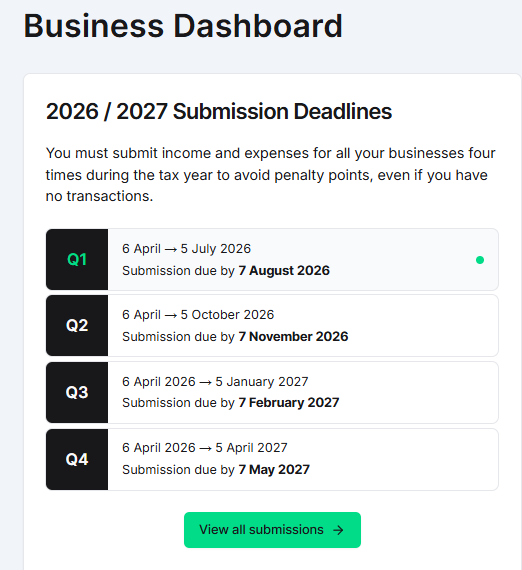
A simple way to think about it is to treat each self-employment or property rental income stream as its own quarterly return.
Using spreadsheets?
If you keep your records in spreadsheets, you can still do so and stay compliant with MTD IT. TaxNav makes the process simple and compliant with Making Tax Digital for Income Tax. Each income source should have its own spreadsheet containing our easy-to-use TaxNav summary sheet or TaxNav tab, which we'll provide and is quick to add.
Our bridging technology converts your spreadsheet information into the format required for your quarterly update. You can review the information before clicking Submit. When you’re happy, TaxNav software sends it securely to HMRC.
For many people managing multiple income sources, this spreadsheet import process is one of the biggest time-savers.
What about UK and overseas property?
For quarterly updates, there is no difference between reporting UK and overseas property income.
However, the annual declaration is more detailed for overseas property income, as information must be broken down by country and individual property, where required.
Jointly owned rental properties
If you jointly own a rental property, each owner reports their own share of the income. Making Tax Digital for Income Tax works at an individual level, so each person submits information relating to their own National Insurance number.
Your tax position in one place
Although each income source is managed and submitted separately, HMRC combines the information from all of your quarterly updates to calculate your overall tax position.
Once HMRC has processed your most recent quarterly updates, your latest tax position is reflected in your TaxNav dashboard. This is typically within a couple of hours of submission, although the timing depends on HMRC's processing times.
Having an up-to-date view of your estimated tax position throughout the year can make budgeting easier and help you prepare for future tax payments. Your final tax liability won't be confirmed until you've completed your annual declaration.
What happens at the annual declaration?
At the end of the tax year, you'll review each income source as part of your annual declaration. This is your opportunity to check that the figures for every income source are correct and make any necessary adjustments. For example, adding information that wasn't available when your fourth quarterly update was submitted. It’s also when you add any additional non-trade-related income, such as dividends, interest etc.
Managing mixed income doesn't have to be complicated
Having more than one income source doesn't mean Making Tax Digital for Income Tax has to become more difficult. The key is to think of each self-employment or property income source as its own reporting entity.
TaxNav keeps them all organised within a single account, making it easier to prepare and submit the separate quarterly updates required by HMRC while also giving you an up-to-date view of your overall tax position.
You can get set up and start using TaxNav for free, with nothing to pay until you're ready to submit to HMRC. TaxNav costs £6 + VAT per month or £60 + VAT per year, with one subscription covering all your MTD IT self-employment and property income sources.
Get started with TaxNav for free