
Standard or calendar quarterly reporting for Making Tax Digital IT?

Making Tax Digital for Income Tax (MTD IT) introduces mandatory quarterly submissions for self-employed people and those with property rental income.
Quarterly updates involve submitting year-to-date totals of income and expenses from self-employment and/or property rental to HMRC. These updates are submitted separately for each income source, rather than as detailed individual transactions.
One area many MTD IT taxpayers are less familiar with is that there are actually two different ways those quarterly reporting periods can be set. These are known as standard quarters and calendar quarters.
For many businesses and individuals, the difference may seem small at first glance. In practice though, choosing the right reporting cycle can make record keeping and quarterly submissions much simpler and more manageable.
What are standard MTD IT quarterly updates?
Under MTD IT, self-employed people and those with property rental income are automatically placed by HMRC onto standard quarterly reporting periods unless they choose otherwise.
HMRC’s standard quarters follow the tax year rather than the calendar year and so are:
- 6 April to 5 July
- 6 July to 5 October
- 6 October to 5 January
- 6 January to 5 April
The submission deadlines for these quarterly updates are Quarter 1: 7 August, Quarter 2: 7 November, Quarter 3: 7 February and Quarter 4: 7 May. Remember, in these submissions, MTD IT taxpayers only need to report their year-to-date totals of income and expenses.
This means quarterly updates directly align with the UK tax year, which works well for some businesses and individuals. For others, though, it can create awkward cut-off dates that do not match their usual record-keeping routine.
What are calendar quarterly updates?
Calendar quarterly updates follow more familiar month-end reporting periods:
- 1 April* to 30 June (deadline submission by 7 August)
- 1 July to 30 September (submission by 7 November)
- 1 October to 31 December (submission by 7 February)
- 1 January to 31 March (submission by 7 May)
Many businesses already keep records or reconcile accounts on a calendar-month basis, so this approach can feel far more natural.
For example, a business already working to monthly bookkeeping cycles may find it easier to prepare quarterly figures ending neatly at the month's end rather than splitting records around 5th-of-the-month tax dates.
Importantly, the submission deadlines remain the same whether a business uses standard quarters or calendar quarters. Only the reporting periods themselves change.
*As this is the first year of HMRC’s MTD IT, the initial calendar quarter effectively begins on 6 April to align with the start of the tax year.
Why do calendar quarters often feel simpler?
The main advantage is practical administration. Many bookkeeping systems, bank exports, spreadsheets, and accounting processes naturally operate on a calendar-month basis. Using calendar quarters can therefore reduce the need for:
- Splitting months between quarters.
- Partial month calculations.
- Manual adjustments.
- Awkward spreadsheet cut-offs.
For self-employed people and those with property rental income using spreadsheets, calendar quarters can make MTD IT reporting feel more practical and easier to manage.
Do you have to use calendar quarters?
No. Standard quarters remain HMRC’s default option. If a taxpayer wants to use calendar quarterly reporting instead, the change must be made through their MTD IT software. It cannot currently be changed through HMRC’s online services directly. TaxNav lets you do this quickly and easily, for example:
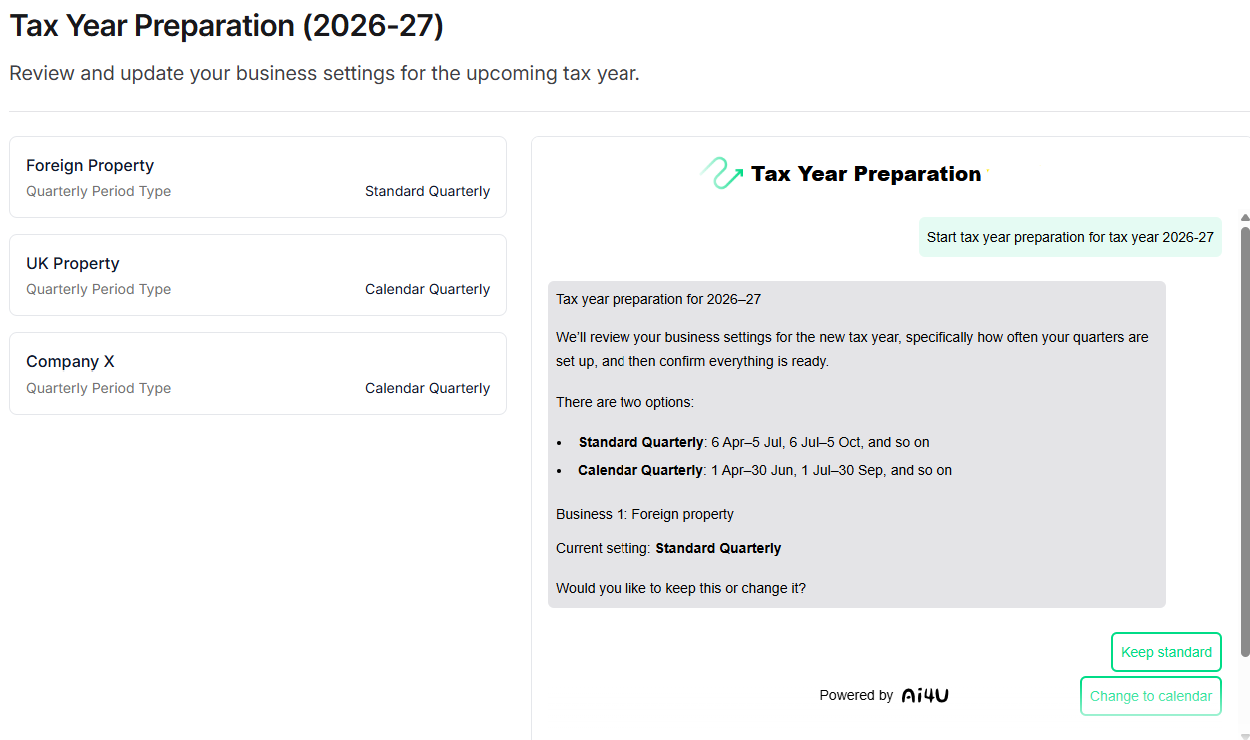
Once selected, calendar quarterly reporting continues each year unless the taxpayer chooses to switch back.
Is there anything else to remember with calendar quarters?
Yes. Although calendar quarters simplify quarterly reporting during the year, MTD IT still ultimately works to the tax year ending on 5 April.
That means after the final calendar quarter submission covering 1 January to 31 March, businesses still need to account for the additional period through to 5 April before completing the annual declaration.
In practice, this is usually only a short adjustment period, but it is an important detail that people are often unaware of when first choosing calendar quarterly updates.
Different income sources can use different reporting settings
Another important point many people miss is that quarterly reporting settings apply per income source, not per taxpayer. For example:
- someone with self-employment income could use calendar quarters,
- while their separate property rental income uses standard quarters.
This flexibility can be useful where different businesses or income streams are managed in different ways. It also means their HMRC-recognised MTD IT software needs to handle multiple reporting approaches clearly and accurately. Fortunately, TaxNav does and lets you have multiple income sources in one account.
How TaxNav helps keep quarterly reporting simple
TaxNav software is designed to support both standard and calendar quarterly reporting under MTD IT. Using our HMRC-recognised software, users can:
- Continue working with spreadsheets if preferred, using TaxNav’s bridging functionality to import figures to HMRC for quarterly updates and their annual declaration.
- Use TaxNav's simple browser-based platform to manually enter figures directly into the software.
- Choose the quarterly reporting cycle that best fits how they already manage records.
- Manage multiple income sources, such as self-employment and property rental income, within one account.
- Apply different reporting settings across separate business and property income streams.
- Submit quarterly updates and annual declarations to HMRC quickly and easily through TaxNav’s user-friendly dashboard.
One TaxNav account can support multiple income sources and submissions. You can get set up and start using TaxNav for free, with nothing to pay until you're ready to submit to HMRC. When you're ready to submit, TaxNav costs £6 + VAT per month or £60 + VAT per year.
Most importantly, TaxNav helps self-employed people and those with property rental income adapt to MTD IT without having to change the way they already work.
Summary
Choosing between standard and calendar quarterly reporting might seem like a minor technical choice, but it can significantly affect how manageable MTD IT feels in practice for you.
For many self-employed individuals and those with property rental income, calendar quarters may better align with their existing bookkeeping routines and spreadsheet processes. The key is to understand how each option works and to use software that enables the flexibility MTD IT allows.
See how simple MTD IT quarterly reporting can be with TaxNav.